




Enterprise marketers define “enterprise” in many different ways. For some, it is described by the number of pages on a website, and for others, it is defined by how many workers are employed at a company. But no matter how we choose to describe it: enterprise-level businesses face the same unique challenges in enterprise SEO. When tackling enterprise-level SEO, there are more moving pieces, departments, and stakeholders than smaller organizations and websites face.
Once your company has reached an enterprise level, it is time to re-evaluate your SEO strategy. Enterprise and traditional SEO focus on critical areas to help your website succeed, improve revenue, and place your website at the top of SERPs (search engine results pages). This blog will discuss why enterprise SEO is necessary and what to expect when working with an enterprise SEO agency.
Is Enterprise SEO Necessary?
Enterprise SEO is a necessary and effective marketing channel to pursue if appropriately implemented. It helps push organic users to your website, which, in turn, can have a positive impact on your bottom line.
But before you catch your audience’s attention, enterprise marketing can present unique challenges to SEO optimizes your online visibility— no matter the size of your business. Your online presence builds trust with new and existing customers, helping you establish credibility. But as your company grows, this task can become more challenging. This is why implementing your enterprise SEO strategy differs from how you would take on an SEO strategy for a small to mid-sized business.
An enterprise SEO agency has the tools and resources to maximize your SEO, helping you achieve optimal results, such as increased brand awareness, new leads, and significantly more conversions. Enterprise SEO requires due diligence and a skill set that you can only find with a reputable digital marketing agency.
What Makes Enterprise SEO Uniquely Difficult?
Just like any marketing strategy, consider your audience. While you are marketing to another business, It is no surprise when we tell you that 50% of all website traffic begins with an organic search. With that said, 93% of all online experiences start with the search engine. So ensuring your website pages are ready to rank at the top of the search engine results pages (SERPs) takes a lot more manpower than a small-scale business. Not only do you have hundreds or maybe even thousands of website pages to manage with enterprise SEO, but the scale of your traffic and conversions changes, too. A reputable enterprise SEO agency can address these unique challenges of enterprise marketing with a sound enterprise-level SEO strategy that takes into consideration the technical and business challenges inherent in enterprise-level businesses and websites.
What to Expect When Using an Enterprise SEO Agency
Several unique challenges come with marketing to enterprises. From producing engaging B2B content to When you work with an enterprise SEO agency, there are many things to expect, whether that is outlining a clear strategy or auditing your current website. An enterprise SEO agency addresses some of the unique challenges of enterprise marketing and implements complex strategies in everything from analytics to auditing and analysis.
Auditing and Analysis
The first step in any enterprise SEO strategy is thorough auditing and analysis. This means looking into how your website is already functioning and taking a deep dive into three main categories: relevance, authority, and technical SEO.
- Relevance
Relevance identifies how relevant your content is in correlation to search terms. For example, “translation” has two main ideas attached. The first is what most people know it as – converting one language to another. The second is translations placed in biology as the process of translating the sequence of a messenger RNA (mRNA) molecule to a sequence of amino acids during protein synthesis.
When we create content around “translation” we have to be sure we are targeting those looking for “language translation” topics and not “biological translation”. Below is an example of that shows the search term “how does translation work” in reference to biology, not language translation. Creating longer-tail keywords such as “how does machine translation work”, “how does google translate work”, or “how does localization work” ensures relevancy with language-related translation.
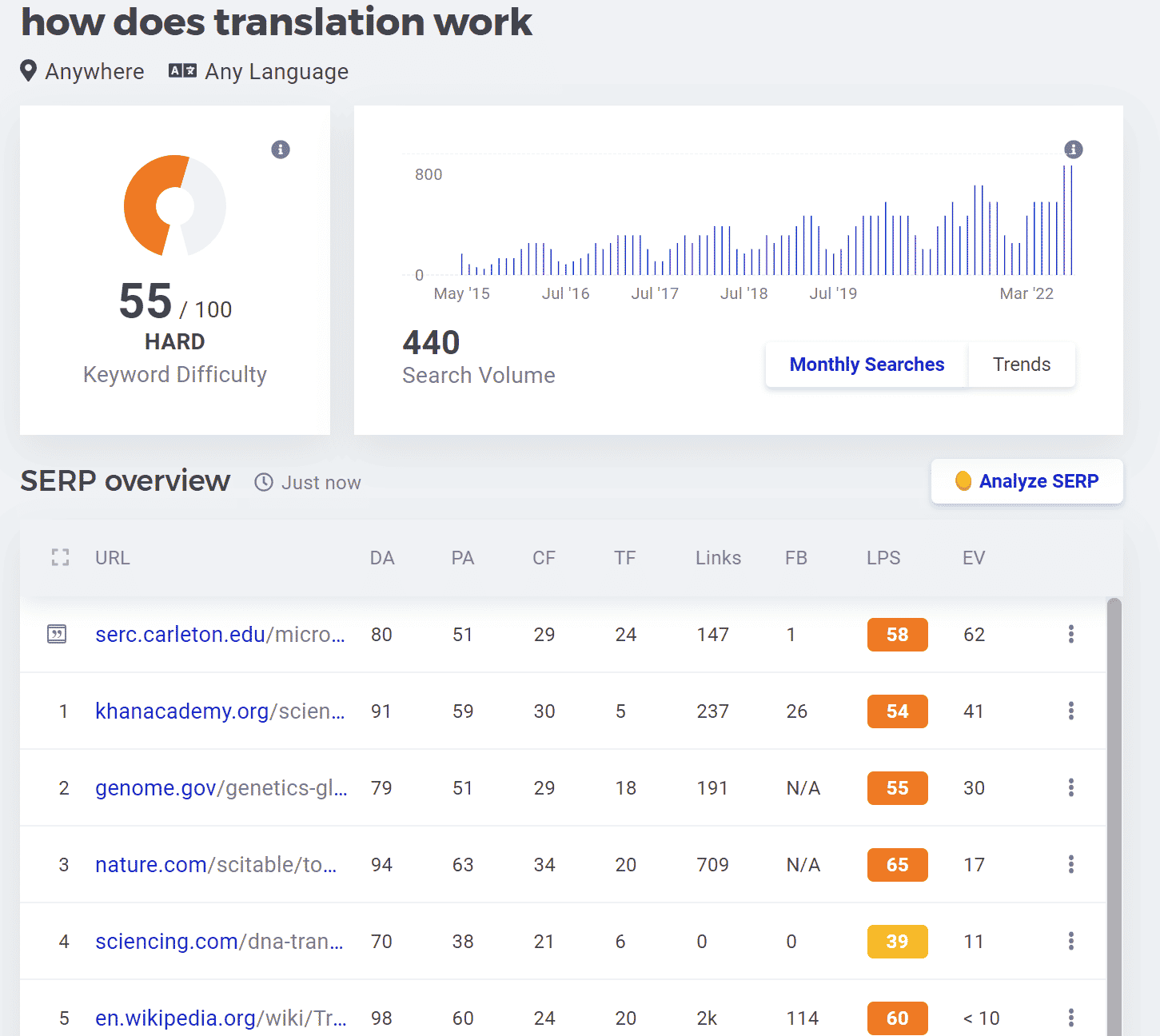 Table of Contents:
- Introduction: WordPress SEO Optimization: A Complete Checklist for Higher Rankings
- Choose an SEO-Friendly WordPress Theme
- Install an SEO Plugin (Which One to Use?)
- Optimize Your Permalinks for SEO
- Do Smart Keyword Research
- Optimize Meta Titles, Descriptions & ALT Tags
- Compress & Optimize Images for Faster Load Time
- Improve Page Speed (Caching, CDN, & Database Optimization)
- Ensure Your Site is Mobile-Friendly
- Secure Your Site with HTTPS
- Use Internal Linking to Boost SEO
- Build High-Quality Backlinks
- Final Thoughts: WordPress SEO Optimization Success
Introduction
If you’re using WordPress, you already have an SEO-friendly foundation—but that doesn’t mean your site is fully optimized. Without the right WordPress SEO settings, plugins, and strategies, your pages might never reach their ranking potential.
One of the biggest reasons WordPress SEO optimization is so effective is that WordPress is built with clean, lightweight code, making it easier for search engines like Google to crawl and index your content. Unlike other website builders that limit customization, WordPress gives you full control over on-page SEO, including meta titles, descriptions, URLs, schema markup, and structured data. Additionally, WordPress allows users to easily integrate SEO plugins for WordPress like All in One SEO or Yoast SEO, which streamline optimization tasks and improve search visibility.
Another major advantage of using WordPress for SEO is its flexibility with themes and plugins. Many WordPress SEO-friendly themes are designed for fast load times, mobile responsiveness, and proper HTML structure—three key ranking factors in Google’s algorithm. Furthermore, WordPress makes it easy to create optimized content with proper headings, internal linking, and multimedia elements to enhance user experience and engagement.
Compared to site builders like Wix, Squarespace, or Shopify, WordPress offers better technical SEO capabilities, including full access to customized permalinks, XML sitemaps, advanced caching, and database optimization. This means you can optimize WordPress for SEO on a much deeper level, ensuring better rankings over time. (Don’t fret if your site is already on Wix, Squarespace or Shopify! These sites can still be very well optimized.)
Whether you’re running a blog, business website, or eCommerce store, following this WordPress SEO checklist will help you maximize your organic traffic and outrank competitors. Let’s dive into the best SEO tips for WordPress to help your site reach the top of search results.
1. Choose an SEO-Friendly WordPress Theme
Your WordPress theme affects site speed, structure, and user experience—all of which impact SEO. A bloated, slow WordPress theme with poor coding can hurt your rankings before you even start.
What Makes a Theme SEO-Friendly?
✅ Fast-loading (loads in under 2 seconds)
✅ Fully responsive (works on all devices)
✅ Schema markup support (helps search engines understand your content)
✅ Accessibility-friendly (for users and WordPress SEO benefits)
Top SEO-Friendly WordPress Themes:
- Astra – Lightweight, fast, and integrates well with page builders.
- GeneratePress – Highly optimized for speed and SEO.
- OceanWP – Feature-rich and performance-focused.
- Kadence – Great design flexibility without unnecessary bloat.
- Neve – Minimalist, fast, and mobile-optimized.
- Schema – Specifically designed for SEO with built-in rich snippets.
A slow-loading theme hurts WordPress SEO optimization, so choosing one of these SEO-friendly themes is a crucial first step.
2. Install an SEO Plugin
What Is a Plugin & Why Do You Need One?
A WordPress plugin is an add-on tool that extends your site’s functionality. WordPress doesn’t automatically optimize for SEO, so an SEO plugin is essential for customizing meta tags, creating XML sitemaps, improving content analysis, and more.
Which SEO Plugin Should You Use?
You only need ONE SEO plugin—installing multiple can cause conflicts. Here’s a comparison:
- Yoast SEO (open in new tab) – Offers readability analysis, SEO recommendations, and structured data integration. We like its beginner-friendly setup, but the free version is limited and pushes for upgrades.
- Rank Math (open in new tab) – More features than Yoast in the free version, including schema markup, redirection management, and keyword tracking. Great for those comfortable with SEO settings.
- All in One SEO (open in new tab) (Best Choice for Multiple WordPress Sites) – We recommend and prefer this particular WordPress plugin for WordPress SEO because it includes automatic XML sitemaps, AI-powered content analysis, and deep WooCommerce SEO integrations. It’s the best choice if you manage multiple WordPress sites since it has centralized settings for easier management.
3. Optimize Your Permalinks
What Is a Permalink & Why Does It Matter?
A permalink (permanent link) is the URL structure for your pages and posts. Search engines use permalinks to understand content, and a well-structured permalink improves click-through rates and rankings.
Best WordPress Permalink Structure for SEO
WordPress defaults to:
❌ yourwebsite.com/?p=123 (Bad for SEO—unclear and unreadable)
Instead, go to Settings > Permalinks and choose:
✅ Post Name: yourwebsite.com/best-wordpress-seo-tips/ (Good for SEO—clear and keyword-rich)
A descriptive permalink improves rankings by making it easier for search engines and users to understand what your page is about.
4. Do Smart Keyword Research
Why Is Keyword Research Important?
Keyword research ensures that your content targets terms that people are searching for and that you’re attracting qualified visitors to your site.
How to Find the Best Keywords for WordPress SEO Optimization:
- Use Keyword Tools – Google Keyword Planner, Ahrefs, SEMrush, or Ubersuggest.
- Look for High-Intent Keywords – Prioritize search terms with moderate competition and high intent (e.g., “best SEO plugins for WordPress” instead of just “SEO”).
- Analyze Competitor Rankings – Find gaps in their content and create better, more detailed versions.
Proper SEO keyword research ensures that your pages rank for relevant searches and attract visitors who are actually interested in your content.
Keyword Research Tools: Which One Should You Use?
- Google Keyword Planner (open in new tab) – A free tool by Google that provides keyword search volume and competition data, but it’s primarily designed for Google Ads, so organic SEO insights may be limited.
- Ahrefs (open in new tab) – A powerful paid SEO tool that offers detailed keyword analysis, competition research, and backlink data, making it great for in-depth SEO strategy.
- SEMrush (open in new tab) – Similar to Ahrefs, but with additional features for content marketing and PPC research, plus an SEO writing assistant to optimize content in real-time.
- Ubersuggest (open in new tab) – A beginner-friendly, freemium tool that provides basic keyword research, search volume, and SEO difficulty insights, making it a good option for those on a budget.
Should You Use All These Tools?
No, you don’t need to use all of them. Google Keyword Planner is a good free starting point, but for deeper insights, Ahrefs or SEMrush are the best choices. If you’re on a budget, Ubersuggest can provide basic keyword ideas, but its data is less comprehensive. Choose one or two tools based on your SEO needs and budget.
5. Optimize Meta Titles, Descriptions & ALT Tags
How Google Uses Meta Titles & Descriptions
A well-crafted meta title and description can significantly improve click-through rates (CTR), crucial in maintaining and improving your organic rankings. When more users click on your result in search engines, Google sees it as a signal that your page is relevant and valuable, which can lead to higher rankings over time.
Examples:
✅ SEO-Friendly Title: WordPress SEO Optimization: The Essential Checklist for Higher Rankings
✅ SEO-Friendly Description: Learn how to optimize WordPress for SEO with this step-by-step guide. Discover the best WordPress SEO tips, plugins, and strategies to boost your rankings.
ALT Tags & Their SEO Role
An ALT tag (alternative text) describes an image for search engines and visually impaired users, but it also plays a role in SEO rankings. Google crawls and indexes ALT text to understand the content of an image since search engines can’t “see” images the way humans do. Properly optimized ALT tags help images appear in Google Image Search results, driving additional traffic to your site. Additionally, Google considers page relevance and user experience when ranking a page, so well-written ALT text contributes to overall WordPress SEO optimization by improving accessibility and reinforcing keyword relevance.
✅ SEO-Friendly ALT: SEO plugins for WordPress – Yoast vs. Rank Math vs. All in One SEO
Properly optimized ALT tags help Google rank your images in search results.
6. Optimize Images & Compress Files
Why Image Compression Matters for SEO
Large images slow down your website, and Google prioritizes fast sites. Compressing images improves page speed and WordPress SEO rankings.
Top Image Compression Tools for WordPress:
✅ TinyPNG – Easy, free, and maintains image quality.
✅ ShortPixel – Automatically compresses images on upload in WordPress.
We recommend ShortPixel because it automatically compresses images on upload, which saves time and ensures all images are optimized without extra manual steps. It also offers lossy, glossy, and lossless compression options, allowing users to balance image quality and file size based on their needs.
However, TinyPNG is a great free alternative for manual image compression before uploading to WordPress. It’s simple to use and maintains excellent image quality, but it doesn’t offer automatic compression within WordPress, making it less efficient for larger sites.
For WordPress SEO optimization, reducing image file sizes is crucial for faster page speeds, which directly impacts rankings and user experience—so we recommend ShortPixel for its automation and efficiency.
7. Improve Page Speed
Google recommends a page load time of under 2.5 seconds for optimal WordPress SEO. Test your speed with Google PageSpeed Insights.
How to Improve WordPress Speed:
🚀 Enable caching (WP Rocket or W3 Total Cache)
🚀 Use a CDN (Cloudflare, BunnyCDN)
🚀 Optimize database (WP-Optimize)
A fast site improves SEO rankings and user experience.
Enable Caching (WP Rocket or W3 Total Cache)
Caching helps WordPress load pages faster by storing static versions of your site, reducing the need for the server to generate pages every time a visitor arrives.
How to Enable Caching in WordPress
- Install and activate WP Rocket (recommended) or W3 Total Cache from the WordPress plugin directory.
- If using WP Rocket (paid), caching is automatically enabled upon activation—no extra setup needed.
- If using W3 Total Cache (free), go to Performance > General Settings in your WordPress dashboard.
- Enable Page Cache, Object Cache, and Browser Cache for faster loading.
- Save changes and test your site’s speed using Google PageSpeed Insights.
Why Caching Improves WordPress SEO
By reducing server load and page load times, caching improves Core Web Vitals, a key ranking factor for Google. Faster pages lead to lower bounce rates and better user experience, both of which help with SEO for WordPress.
Use a CDN (Cloudflare or BunnyCDN)
A Content Delivery Network (CDN) distributes your website’s static files (images, CSS, JavaScript) across multiple servers worldwide, ensuring users load content from the closest server—dramatically improving load times.
How to Enable a CDN in WordPress
- Sign up for a CDN service like Cloudflare (free) or BunnyCDN (affordable paid option).
- If using Cloudflare, install the Cloudflare plugin in WordPress.
- Follow the setup wizard to change your DNS settings and route traffic through Cloudflare.
- If using BunnyCDN, install the BunnyCDN plugin and follow the setup instructions to configure your pull zone.
- Verify your CDN is working by testing your site speed in Google PageSpeed Insights or GTmetrix.
Why a CDN Helps with WordPress SEO Optimization
A CDN reduces server response time, ensuring that your website loads quickly regardless of a visitor’s location. Google prioritizes fast, globally accessible websites, making a CDN essential for optimizing WordPress for SEO.
Optimize Your WordPress Database (WP-Optimize)
Over time, WordPress databases collect unnecessary data (revisions, spam comments, trashed posts) that slow down your site. Cleaning your database improves performance and SEO rankings.
How to Optimize Your Database in WordPress
- Install and activate WP-Optimize from the WordPress plugin directory.
- Go to WP-Optimize > Database in your WordPress dashboard.
- Select options to clean:
✅ Remove post revisions
✅ Delete spam & trashed comments
✅ Optimize database tables - Click Run Optimization to remove unnecessary data.
- Enable scheduled cleanups to keep your database optimized regularly.
Why Database Optimization Matters for WordPress SEO
A bloated database slows down WordPress, making pages take longer to load. Regular optimization keeps WordPress SEO-friendly, ensuring fast site performance, which helps with ranking higher in Google search results.
Final Thoughts: Speed Up WordPress SEO Optimization
By enabling caching, using a CDN, and optimizing your database, your site will load faster, rank better, and provide a seamless user experience. Implement these SEO tips for WordPress, and test your site speed using Google PageSpeed Insights to track improvements! 🚀
8. Ensure Mobile-Friendliness
After enabling a responsive theme, test your site on Google’s Mobile-Friendly Test to ensure it displays properly.
Ensuring your site is mobile-friendly is essential for WordPress SEO optimization because Google uses mobile-first indexing, meaning it primarily ranks the mobile version of your site. Even if your site looks great on desktop, poor mobile performance can hurt rankings, traffic, and user experience. After enabling a responsive WordPress theme, test your site with Google’s Mobile-Friendly Test to confirm that text, images, and buttons are properly displayed on all devices. A fully optimized mobile site improves engagement, lowers bounce rates, and strengthens SEO for WordPress, helping your pages rank higher in search results.
9. Secure Your Site with HTTPS
Google penalizes non-HTTPS sites. Most WordPress hosting providers (like Bluehost, SiteGround, WP Engine) offer free SSL certificates via Let’s Encrypt. Enable it in your hosting dashboard under “Security” or “SSL.”
10. Internal Links Matter for WordPress SEO Optimization
Internal links play a crucial role in WordPress SEO optimization by helping search engines crawl and understand your site’s structure, while also guiding users to relevant content. When you strategically place internal links, you distribute SEO value (also known as link equity) from high-authority pages to other important pages, which can improve rankings. Google follows internal links to discover new pages, determine how content is related, and evaluate its importance within your site.
How to Identify the Right Internal Links for SEO and UX
To optimize SEO for WordPress, you need to select relevant internal links that enhance both search rankings and user experience (UX). Follow these steps:
- Identify Pages That Need More Authority – If you’re optimizing a new post or a lower-ranking page, link to it from high-performing pages that already have authority.
- Match Internal Links to Keyword Intent – Use anchor text that naturally includes your primary keyword and supports the topic.
- Prioritize Relevance for Users – Link to pages that provide additional value based on what visitors might need next. Avoid forcing links that don’t make sense contextually.
- Use a Site Search or SEO Plugin – In WordPress, use the site search bar or an SEO tool like Yoast SEO or Link Whisper to find existing content that relates to your new post’s topic.
- Avoid Overloading Links – Too many internal links on a page can dilute their impact. Focus on quality over quantity by linking only where it adds real value.
Example of Optimized Internal Linking
Instead of using vague anchor text like:
❌ “Click here to learn more.”
Use a keyword-rich, descriptive internal link:
✅ “Read our guide on WordPress SEO tips to boost your rankings.”
By using descriptive anchor text that includes targeted keywords, you help search engines understand the page’s topic, while also improving UX by setting clear expectations for users. When properly implemented, internal links strengthen WordPress SEO optimization, making your site easier to navigate, better indexed, and more likely to rank higher in search results.
11. Build Quality Backlinks
Backlinks—links from other websites pointing to yours—are one of the strongest ranking factors for WordPress SEO optimization and a crucial component of off-page SEO. Google sees backlinks as votes of confidence, signaling that your content is authoritative, valuable, and trustworthy. The more high-quality backlinks you earn, the higher your site’s domain authority, which improves your chances of ranking for competitive keywords. However, not all backlinks are created equal—quality matters more than quantity. Links from reputable, industry-relevant sites carry more weight than random or low-authority sources.
How to Get Backlinks for WordPress SEO
Earning high-quality backlinks takes time and effort, but the right strategies can significantly improve your SEO for WordPress. Here’s how to build links the right way:
1. Guest Posting on Niche Websites
Guest blogging is one of the most effective ways to get authoritative backlinks while positioning yourself as an industry expert. Look for reputable blogs in your niche that accept guest contributions.
How to do it:
- Search Google for opportunities: “write for us + [your industry]” or “guest post + [your topic]”.
- Reach out with a compelling pitch offering unique, high-value content.
- Ensure your guest post includes a natural link back to your website, ideally within the content, rather than just in the author bio.
2. Publishing Link-Worthy Content (Guides, Research, Tools)
Creating high-value, in-depth content naturally attracts backlinks because other websites want to reference and share useful resources.
Types of link-worthy content:
✅ Ultimate guides – Comprehensive, step-by-step tutorials (e.g., The Complete WordPress SEO Checklist).
✅ Original research & data – Statistics, case studies, and industry trends that journalists and bloggers will cite.
✅ Free tools & templates – Interactive tools, calculators, or downloadable resources that help users.
To increase the chances of earning backlinks, promote your content via outreach, social media, and industry forums.
3. Getting Listed in Business Directories & Industry Listings
If you run a local business or a service-based website, directory listings provide easy, high-quality backlinks while improving local SEO.
Where to get listed:
- Google Business Profile – Essential for local search rankings.
- Industry-specific directories – (e.g., Clutch for agencies, Yelp for restaurants).
- Chamber of Commerce & trade associations – Trusted, authoritative sources.
Why Backlinks Matter for WordPress SEO
Without backlinks, even the best-optimized content may struggle to rank in competitive search results. Google prioritizes websites with strong authority, and backlinks are a key factor in determining trustworthiness and credibility. By securing high-quality backlinks from relevant sources, you boost your domain authority, improve rankings, and drive referral traffic to your site.
Building backlinks takes strategy and persistence, but when done right, it can significantly enhance your WordPress SEO optimization and long-term search visibility.
Final Thoughts: Take Your WordPress SEO to the Next Level
Following this WordPress SEO checklist will help you optimize WordPress for SEO and improve rankings. Need expert help? Bullseye Strategy specializes in WordPress SEO optimization—let’s take your site to the top!
Download a PDF version of this here for your reference.
” class=”wp-image-6641″/>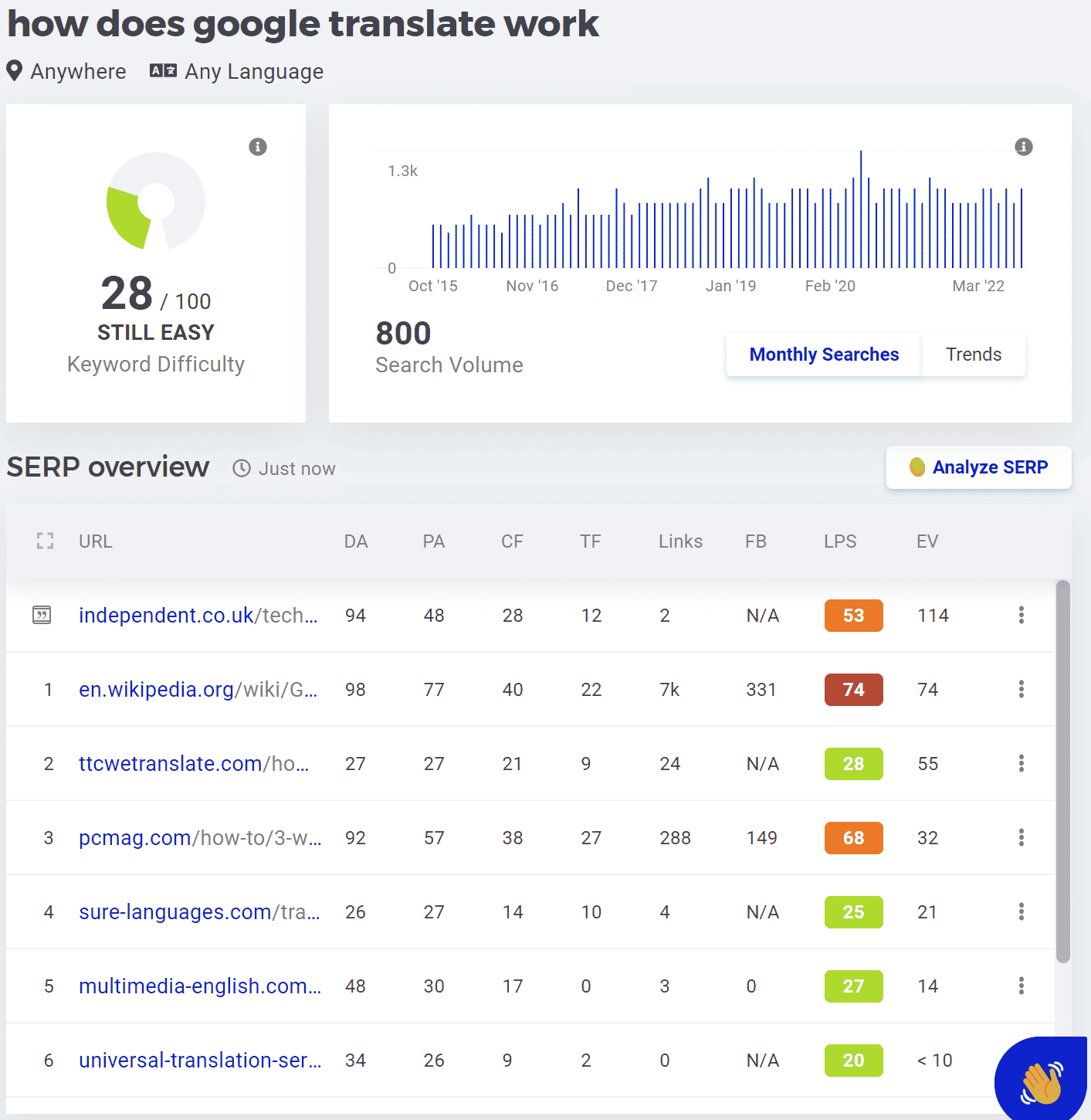 Table of Contents:
- Introduction: WordPress SEO Optimization: A Complete Checklist for Higher Rankings
- Choose an SEO-Friendly WordPress Theme
- Install an SEO Plugin (Which One to Use?)
- Optimize Your Permalinks for SEO
- Do Smart Keyword Research
- Optimize Meta Titles, Descriptions & ALT Tags
- Compress & Optimize Images for Faster Load Time
- Improve Page Speed (Caching, CDN, & Database Optimization)
- Ensure Your Site is Mobile-Friendly
- Secure Your Site with HTTPS
- Use Internal Linking to Boost SEO
- Build High-Quality Backlinks
- Final Thoughts: WordPress SEO Optimization Success
Introduction
If you’re using WordPress, you already have an SEO-friendly foundation—but that doesn’t mean your site is fully optimized. Without the right WordPress SEO settings, plugins, and strategies, your pages might never reach their ranking potential.
One of the biggest reasons WordPress SEO optimization is so effective is that WordPress is built with clean, lightweight code, making it easier for search engines like Google to crawl and index your content. Unlike other website builders that limit customization, WordPress gives you full control over on-page SEO, including meta titles, descriptions, URLs, schema markup, and structured data. Additionally, WordPress allows users to easily integrate SEO plugins for WordPress like All in One SEO or Yoast SEO, which streamline optimization tasks and improve search visibility.
Another major advantage of using WordPress for SEO is its flexibility with themes and plugins. Many WordPress SEO-friendly themes are designed for fast load times, mobile responsiveness, and proper HTML structure—three key ranking factors in Google’s algorithm. Furthermore, WordPress makes it easy to create optimized content with proper headings, internal linking, and multimedia elements to enhance user experience and engagement.
Compared to site builders like Wix, Squarespace, or Shopify, WordPress offers better technical SEO capabilities, including full access to customized permalinks, XML sitemaps, advanced caching, and database optimization. This means you can optimize WordPress for SEO on a much deeper level, ensuring better rankings over time. (Don’t fret if your site is already on Wix, Squarespace or Shopify! These sites can still be very well optimized.)
Whether you’re running a blog, business website, or eCommerce store, following this WordPress SEO checklist will help you maximize your organic traffic and outrank competitors. Let’s dive into the best SEO tips for WordPress to help your site reach the top of search results.
1. Choose an SEO-Friendly WordPress Theme
Your WordPress theme affects site speed, structure, and user experience—all of which impact SEO. A bloated, slow WordPress theme with poor coding can hurt your rankings before you even start.
What Makes a Theme SEO-Friendly?
✅ Fast-loading (loads in under 2 seconds)
✅ Fully responsive (works on all devices)
✅ Schema markup support (helps search engines understand your content)
✅ Accessibility-friendly (for users and WordPress SEO benefits)
Top SEO-Friendly WordPress Themes:
- Astra – Lightweight, fast, and integrates well with page builders.
- GeneratePress – Highly optimized for speed and SEO.
- OceanWP – Feature-rich and performance-focused.
- Kadence – Great design flexibility without unnecessary bloat.
- Neve – Minimalist, fast, and mobile-optimized.
- Schema – Specifically designed for SEO with built-in rich snippets.
A slow-loading theme hurts WordPress SEO optimization, so choosing one of these SEO-friendly themes is a crucial first step.
2. Install an SEO Plugin
What Is a Plugin & Why Do You Need One?
A WordPress plugin is an add-on tool that extends your site’s functionality. WordPress doesn’t automatically optimize for SEO, so an SEO plugin is essential for customizing meta tags, creating XML sitemaps, improving content analysis, and more.
Which SEO Plugin Should You Use?
You only need ONE SEO plugin—installing multiple can cause conflicts. Here’s a comparison:
- Yoast SEO (open in new tab) – Offers readability analysis, SEO recommendations, and structured data integration. We like its beginner-friendly setup, but the free version is limited and pushes for upgrades.
- Rank Math (open in new tab) – More features than Yoast in the free version, including schema markup, redirection management, and keyword tracking. Great for those comfortable with SEO settings.
- All in One SEO (open in new tab) (Best Choice for Multiple WordPress Sites) – We recommend and prefer this particular WordPress plugin for WordPress SEO because it includes automatic XML sitemaps, AI-powered content analysis, and deep WooCommerce SEO integrations. It’s the best choice if you manage multiple WordPress sites since it has centralized settings for easier management.
3. Optimize Your Permalinks
What Is a Permalink & Why Does It Matter?
A permalink (permanent link) is the URL structure for your pages and posts. Search engines use permalinks to understand content, and a well-structured permalink improves click-through rates and rankings.
Best WordPress Permalink Structure for SEO
WordPress defaults to:
❌ yourwebsite.com/?p=123 (Bad for SEO—unclear and unreadable)
Instead, go to Settings > Permalinks and choose:
✅ Post Name: yourwebsite.com/best-wordpress-seo-tips/ (Good for SEO—clear and keyword-rich)
A descriptive permalink improves rankings by making it easier for search engines and users to understand what your page is about.
4. Do Smart Keyword Research
Why Is Keyword Research Important?
Keyword research ensures that your content targets terms that people are searching for and that you’re attracting qualified visitors to your site.
How to Find the Best Keywords for WordPress SEO Optimization:
- Use Keyword Tools – Google Keyword Planner, Ahrefs, SEMrush, or Ubersuggest.
- Look for High-Intent Keywords – Prioritize search terms with moderate competition and high intent (e.g., “best SEO plugins for WordPress” instead of just “SEO”).
- Analyze Competitor Rankings – Find gaps in their content and create better, more detailed versions.
Proper SEO keyword research ensures that your pages rank for relevant searches and attract visitors who are actually interested in your content.
Keyword Research Tools: Which One Should You Use?
- Google Keyword Planner (open in new tab) – A free tool by Google that provides keyword search volume and competition data, but it’s primarily designed for Google Ads, so organic SEO insights may be limited.
- Ahrefs (open in new tab) – A powerful paid SEO tool that offers detailed keyword analysis, competition research, and backlink data, making it great for in-depth SEO strategy.
- SEMrush (open in new tab) – Similar to Ahrefs, but with additional features for content marketing and PPC research, plus an SEO writing assistant to optimize content in real-time.
- Ubersuggest (open in new tab) – A beginner-friendly, freemium tool that provides basic keyword research, search volume, and SEO difficulty insights, making it a good option for those on a budget.
Should You Use All These Tools?
No, you don’t need to use all of them. Google Keyword Planner is a good free starting point, but for deeper insights, Ahrefs or SEMrush are the best choices. If you’re on a budget, Ubersuggest can provide basic keyword ideas, but its data is less comprehensive. Choose one or two tools based on your SEO needs and budget.
5. Optimize Meta Titles, Descriptions & ALT Tags
How Google Uses Meta Titles & Descriptions
A well-crafted meta title and description can significantly improve click-through rates (CTR), crucial in maintaining and improving your organic rankings. When more users click on your result in search engines, Google sees it as a signal that your page is relevant and valuable, which can lead to higher rankings over time.
Examples:
✅ SEO-Friendly Title: WordPress SEO Optimization: The Essential Checklist for Higher Rankings
✅ SEO-Friendly Description: Learn how to optimize WordPress for SEO with this step-by-step guide. Discover the best WordPress SEO tips, plugins, and strategies to boost your rankings.
ALT Tags & Their SEO Role
An ALT tag (alternative text) describes an image for search engines and visually impaired users, but it also plays a role in SEO rankings. Google crawls and indexes ALT text to understand the content of an image since search engines can’t “see” images the way humans do. Properly optimized ALT tags help images appear in Google Image Search results, driving additional traffic to your site. Additionally, Google considers page relevance and user experience when ranking a page, so well-written ALT text contributes to overall WordPress SEO optimization by improving accessibility and reinforcing keyword relevance.
✅ SEO-Friendly ALT: SEO plugins for WordPress – Yoast vs. Rank Math vs. All in One SEO
Properly optimized ALT tags help Google rank your images in search results.
6. Optimize Images & Compress Files
Why Image Compression Matters for SEO
Large images slow down your website, and Google prioritizes fast sites. Compressing images improves page speed and WordPress SEO rankings.
Top Image Compression Tools for WordPress:
✅ TinyPNG – Easy, free, and maintains image quality.
✅ ShortPixel – Automatically compresses images on upload in WordPress.
We recommend ShortPixel because it automatically compresses images on upload, which saves time and ensures all images are optimized without extra manual steps. It also offers lossy, glossy, and lossless compression options, allowing users to balance image quality and file size based on their needs.
However, TinyPNG is a great free alternative for manual image compression before uploading to WordPress. It’s simple to use and maintains excellent image quality, but it doesn’t offer automatic compression within WordPress, making it less efficient for larger sites.
For WordPress SEO optimization, reducing image file sizes is crucial for faster page speeds, which directly impacts rankings and user experience—so we recommend ShortPixel for its automation and efficiency.
7. Improve Page Speed
Google recommends a page load time of under 2.5 seconds for optimal WordPress SEO. Test your speed with Google PageSpeed Insights.
How to Improve WordPress Speed:
🚀 Enable caching (WP Rocket or W3 Total Cache)
🚀 Use a CDN (Cloudflare, BunnyCDN)
🚀 Optimize database (WP-Optimize)
A fast site improves SEO rankings and user experience.
Enable Caching (WP Rocket or W3 Total Cache)
Caching helps WordPress load pages faster by storing static versions of your site, reducing the need for the server to generate pages every time a visitor arrives.
How to Enable Caching in WordPress
- Install and activate WP Rocket (recommended) or W3 Total Cache from the WordPress plugin directory.
- If using WP Rocket (paid), caching is automatically enabled upon activation—no extra setup needed.
- If using W3 Total Cache (free), go to Performance > General Settings in your WordPress dashboard.
- Enable Page Cache, Object Cache, and Browser Cache for faster loading.
- Save changes and test your site’s speed using Google PageSpeed Insights.
Why Caching Improves WordPress SEO
By reducing server load and page load times, caching improves Core Web Vitals, a key ranking factor for Google. Faster pages lead to lower bounce rates and better user experience, both of which help with SEO for WordPress.
Use a CDN (Cloudflare or BunnyCDN)
A Content Delivery Network (CDN) distributes your website’s static files (images, CSS, JavaScript) across multiple servers worldwide, ensuring users load content from the closest server—dramatically improving load times.
How to Enable a CDN in WordPress
- Sign up for a CDN service like Cloudflare (free) or BunnyCDN (affordable paid option).
- If using Cloudflare, install the Cloudflare plugin in WordPress.
- Follow the setup wizard to change your DNS settings and route traffic through Cloudflare.
- If using BunnyCDN, install the BunnyCDN plugin and follow the setup instructions to configure your pull zone.
- Verify your CDN is working by testing your site speed in Google PageSpeed Insights or GTmetrix.
Why a CDN Helps with WordPress SEO Optimization
A CDN reduces server response time, ensuring that your website loads quickly regardless of a visitor’s location. Google prioritizes fast, globally accessible websites, making a CDN essential for optimizing WordPress for SEO.
Optimize Your WordPress Database (WP-Optimize)
Over time, WordPress databases collect unnecessary data (revisions, spam comments, trashed posts) that slow down your site. Cleaning your database improves performance and SEO rankings.
How to Optimize Your Database in WordPress
- Install and activate WP-Optimize from the WordPress plugin directory.
- Go to WP-Optimize > Database in your WordPress dashboard.
- Select options to clean:
✅ Remove post revisions
✅ Delete spam & trashed comments
✅ Optimize database tables - Click Run Optimization to remove unnecessary data.
- Enable scheduled cleanups to keep your database optimized regularly.
Why Database Optimization Matters for WordPress SEO
A bloated database slows down WordPress, making pages take longer to load. Regular optimization keeps WordPress SEO-friendly, ensuring fast site performance, which helps with ranking higher in Google search results.
Final Thoughts: Speed Up WordPress SEO Optimization
By enabling caching, using a CDN, and optimizing your database, your site will load faster, rank better, and provide a seamless user experience. Implement these SEO tips for WordPress, and test your site speed using Google PageSpeed Insights to track improvements! 🚀
8. Ensure Mobile-Friendliness
After enabling a responsive theme, test your site on Google’s Mobile-Friendly Test to ensure it displays properly.
Ensuring your site is mobile-friendly is essential for WordPress SEO optimization because Google uses mobile-first indexing, meaning it primarily ranks the mobile version of your site. Even if your site looks great on desktop, poor mobile performance can hurt rankings, traffic, and user experience. After enabling a responsive WordPress theme, test your site with Google’s Mobile-Friendly Test to confirm that text, images, and buttons are properly displayed on all devices. A fully optimized mobile site improves engagement, lowers bounce rates, and strengthens SEO for WordPress, helping your pages rank higher in search results.
9. Secure Your Site with HTTPS
Google penalizes non-HTTPS sites. Most WordPress hosting providers (like Bluehost, SiteGround, WP Engine) offer free SSL certificates via Let’s Encrypt. Enable it in your hosting dashboard under “Security” or “SSL.”
10. Internal Links Matter for WordPress SEO Optimization
Internal links play a crucial role in WordPress SEO optimization by helping search engines crawl and understand your site’s structure, while also guiding users to relevant content. When you strategically place internal links, you distribute SEO value (also known as link equity) from high-authority pages to other important pages, which can improve rankings. Google follows internal links to discover new pages, determine how content is related, and evaluate its importance within your site.
How to Identify the Right Internal Links for SEO and UX
To optimize SEO for WordPress, you need to select relevant internal links that enhance both search rankings and user experience (UX). Follow these steps:
- Identify Pages That Need More Authority – If you’re optimizing a new post or a lower-ranking page, link to it from high-performing pages that already have authority.
- Match Internal Links to Keyword Intent – Use anchor text that naturally includes your primary keyword and supports the topic.
- Prioritize Relevance for Users – Link to pages that provide additional value based on what visitors might need next. Avoid forcing links that don’t make sense contextually.
- Use a Site Search or SEO Plugin – In WordPress, use the site search bar or an SEO tool like Yoast SEO or Link Whisper to find existing content that relates to your new post’s topic.
- Avoid Overloading Links – Too many internal links on a page can dilute their impact. Focus on quality over quantity by linking only where it adds real value.
Example of Optimized Internal Linking
Instead of using vague anchor text like:
❌ “Click here to learn more.”
Use a keyword-rich, descriptive internal link:
✅ “Read our guide on WordPress SEO tips to boost your rankings.”
By using descriptive anchor text that includes targeted keywords, you help search engines understand the page’s topic, while also improving UX by setting clear expectations for users. When properly implemented, internal links strengthen WordPress SEO optimization, making your site easier to navigate, better indexed, and more likely to rank higher in search results.
11. Build Quality Backlinks
Backlinks—links from other websites pointing to yours—are one of the strongest ranking factors for WordPress SEO optimization and a crucial component of off-page SEO. Google sees backlinks as votes of confidence, signaling that your content is authoritative, valuable, and trustworthy. The more high-quality backlinks you earn, the higher your site’s domain authority, which improves your chances of ranking for competitive keywords. However, not all backlinks are created equal—quality matters more than quantity. Links from reputable, industry-relevant sites carry more weight than random or low-authority sources.
How to Get Backlinks for WordPress SEO
Earning high-quality backlinks takes time and effort, but the right strategies can significantly improve your SEO for WordPress. Here’s how to build links the right way:
1. Guest Posting on Niche Websites
Guest blogging is one of the most effective ways to get authoritative backlinks while positioning yourself as an industry expert. Look for reputable blogs in your niche that accept guest contributions.
How to do it:
- Search Google for opportunities: “write for us + [your industry]” or “guest post + [your topic]”.
- Reach out with a compelling pitch offering unique, high-value content.
- Ensure your guest post includes a natural link back to your website, ideally within the content, rather than just in the author bio.
2. Publishing Link-Worthy Content (Guides, Research, Tools)
Creating high-value, in-depth content naturally attracts backlinks because other websites want to reference and share useful resources.
Types of link-worthy content:
✅ Ultimate guides – Comprehensive, step-by-step tutorials (e.g., The Complete WordPress SEO Checklist).
✅ Original research & data – Statistics, case studies, and industry trends that journalists and bloggers will cite.
✅ Free tools & templates – Interactive tools, calculators, or downloadable resources that help users.
To increase the chances of earning backlinks, promote your content via outreach, social media, and industry forums.
3. Getting Listed in Business Directories & Industry Listings
If you run a local business or a service-based website, directory listings provide easy, high-quality backlinks while improving local SEO.
Where to get listed:
- Google Business Profile – Essential for local search rankings.
- Industry-specific directories – (e.g., Clutch for agencies, Yelp for restaurants).
- Chamber of Commerce & trade associations – Trusted, authoritative sources.
Why Backlinks Matter for WordPress SEO
Without backlinks, even the best-optimized content may struggle to rank in competitive search results. Google prioritizes websites with strong authority, and backlinks are a key factor in determining trustworthiness and credibility. By securing high-quality backlinks from relevant sources, you boost your domain authority, improve rankings, and drive referral traffic to your site.
Building backlinks takes strategy and persistence, but when done right, it can significantly enhance your WordPress SEO optimization and long-term search visibility.
Final Thoughts: Take Your WordPress SEO to the Next Level
Following this WordPress SEO checklist will help you optimize WordPress for SEO and improve rankings. Need expert help? Bullseye Strategy specializes in WordPress SEO optimization—let’s take your site to the top!
Download a PDF version of this here for your reference.
” class=”wp-image-6642″/>- Authority
Authority is a ranking factor in the overall placement of your website. Enterprise SEO experts build authority through the acquisition of backlinks. There are two types of authority: domain and page authority.
- Domain Authority: describes the relevance of a specific website. It is based on the age and size of your domain and the number of relevant backlinks pointing to the root domain.
- Page Authority: this metric predicts how well specific pages will perform in search engine rankings. Generally, the higher your page authority, the easier it is for that page to rank for the target keywords.
Both domain and page authority are built slowly over time through the acquisition of high-quality backlinks. As content is developed, it can be leveraged in numerous ways to develop backlinks and grow the authority of the site. As this pillar is audited, enterprise SEO professionals will evaluate your website’s backlink profile and conduct a backlink gap analysis to understand where off-page opportunities exist.
- Technical SEO
Once authority and relevance are evaluated, it’s time to look at the infrastructure of your website. This process is known as technical SEO. By analyzing your website’s structure, an enterprise SEO expert can determine how easily search engines can crawl and index it.

Once an enterprise SEO agency completes the evaluation of your website using these three factors, it is time to assess your competition. These experts will evaluate how your competitors are ranking, what they are doing to rank organically, and how they can reverse engineer your website to provide higher ranking results.
Strategy Creation and KPI Alignment
While you want to stay top-of-mind with your B2B prospects, the audience you target depends on the After completing auditing and analysis, it is time to build content and technical strategies, which begins with the crucial step of keyword mapping. This process is necessary to ensure that each page has a specific set of terms that are being targeted. Without keyword mapping, many things can happen, including keyword cannibalization, which is the process of your pages competing with one another, affecting your ability to rank organically.
Keyword mapping is also essential to help you understand how users search and think. Therefore, your content strategy must be based on actual searches, not just what you think people are searching for.
Optimization and Reporting
Once the work is done, you need to evaluate its performance through optimization and reporting. From an enterprise SEO perspective, you want to measure your quarterly performance as this gives ample time to see how the progress develops. However, it is important to note that even though you complete quarterly reports, it may take 6-9 months for any real progress to show.
The Alternatives: Are Enterprise SEO Agencies Needed?
The short answer is no. However, enterprise SEO has many moving parts that are difficult to balance without the assistance of an SEO specialist. SEO is not as simple as consistently creating engaging content. It requires a targeted keyword strategy, deep technical expertise, and the ability to adapt to the constantly changing search algorithms.
Utilizing an Enterprise SEO agency, although not entirely necessary, does make this process of developing the organic presence of your website much easier. Working with freelancers can lead to delays, communication issues, and poor quality work amongst other common issues.
Work With an Agency with Enterprise Experience
When you outsource to an enterprise SEO agency, it is essential to consider your goals, the services needed, your budget, and what impacts outsourcing will have on your existing structure. If you are looking for a trusted partner to optimize your website, Bullseye Strategy is a full-service digital marketing agency specializing in enterprise SEO, paid media, social media, content marketing, and more.